
2.36.24
Variables and parameters
A variable holds a value while a run goes on: a name, an amount, a shipment, a file. Inputs read variables, outputs write them, and a run's Variables tab shows what they hold. A parameter is a variable whose value is given when the run starts. This chapter explains how to add them, who can see which, and how parameters get their values.
The Variables tab
A process's variables are on the designer's Variables tab, with their Name, Type, and whether each is an Array (a list) or a Parameter.
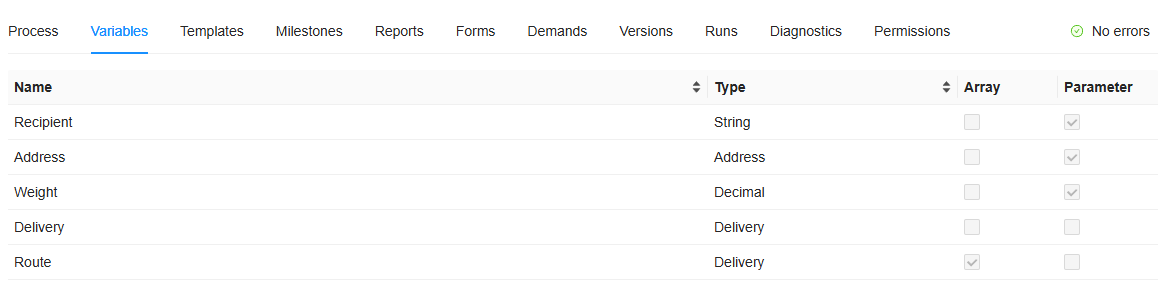
Add variable, on the ribbon, adds one. Open a variable to change it, and Delete deletes the one selected, after asking. A sub-process has a Variables tab of its own, in its settings: see Scope.
A variable's settings
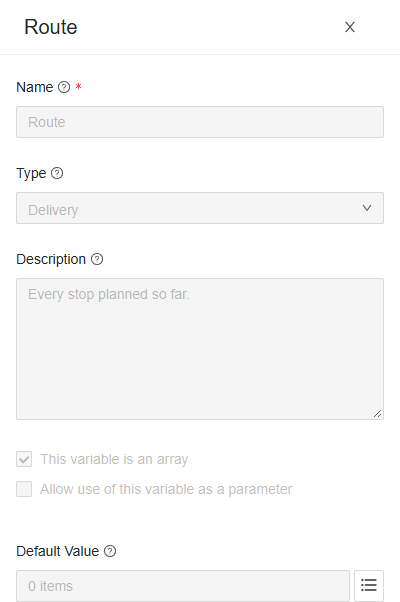
- Name: how inputs, expressions and templates refer to it, such as
{Route}. See Names. - Type: the kind of value it holds. It starts as String, a text. The list holds the built-in types, the organization's own, and those of its integration modules. See Types.
- Description: what it is for. For a parameter, the Start Process Run drawer shows it when you hover over the parameter's name.
- This variable is an array: it holds a list of values of its type, rather than one.
- Allow use of this variable as a parameter: its value can be given when a run starts. See Parameters.
- Default Value: the value it has when a run starts, unless a parameter's value is given. It is a fixed value, typed in as a literal: it can't read other variables. Changing the Type, or ticking This variable is an array, clears it.
A variable has no rules of its own, such as required or a maximum. A type can have them: see Types.
Names
- A name may contain only letters, digits, underscores and hyphens: ShipmentNumber, shipment_number and shipment-number, but not Shipment number.
- A name is unique across the whole process, sub-processes included, without regard to case: Total and total can't both exist.
- Some names are taken: ProcessRun, Item and content belong to Spider.
- Spider reads
{shipmentnumber}as{ShipmentNumber}: case doesn't matter in an expression, nor in a template.
Renaming a variable keeps what refers to it by picking it from a list: outputs, loops, form fields. What refers to it by its name doesn't follow: an expression or a template that still says {OldName} is now wrong. The check reports the expressions (Unknown variable 'OldName'); a template only gets a warning. Look them over after a rename.
Deleting a variable doesn't ask what uses it. Afterwards, the check reports what referred to it, such as an output with The output 'Result' writes a variable that is not declared in this scope.
When a run starts
When a run starts, every variable of the process is there:
- a parameter with the value it was given;
- any other variable with its Default Value;
- and no value at all when it has neither: it is empty, which an expression can test with
isEmpty({Name}).
A sub-process's variables come into being each time the sub-process starts, in the same way: its parameters from its Inputs, the others from their default values.
Parameters
A parameter is how a run gets the values it is started for: the shipment to register, the name to greet. Tick Allow use of this variable as a parameter to make a variable one. Parameters are given:
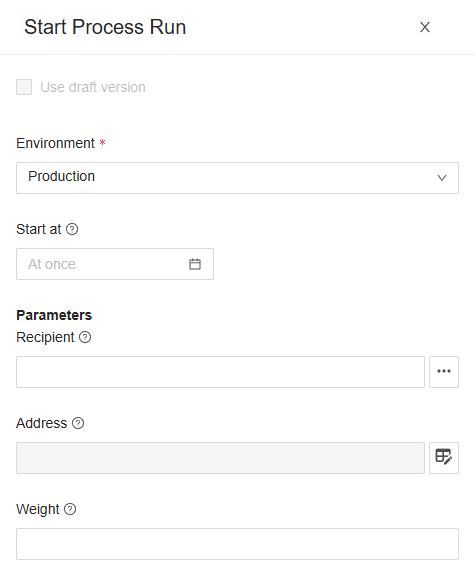
By hand, in the Start Process Run drawer: a field for each parameter of the version you start, filled with its default value. See Start Process Run.
By a trigger: a trigger passes what it received, such as a webhook's posted data or a form's answers, to the parameter you pick in its settings. See Triggers.
By another run, through a start process run node: see Inputs.
Through the API, by name.
Spider doesn't check that every parameter got a value. One that didn't is empty, or has its default value. A parameter is only a way in: during the run it is a variable like any other.
Scope
A sub-process has variables of its own, on the Variables tab of its settings. Who can see which:
- A node reads the variables of its own process or sub-process, and those of every process around it, out to the process itself. A sub-process can read the process's variables; the process can't read the sub-process's.
- A node writes only the variables of its own process or sub-process. A sub-process hands values back to the process around it through its Outputs: see Outputs.
- Two sub-processes side by side can't see each other's variables.
So a sub-process that repeats for each delivery can keep that delivery, and what it works out about it, in variables of its own, and hand back only the result.
Besides the variables you add, two are always there:
- ProcessRun: the run itself.
{ProcessRun.Reference}is the run's reference, such as 20261022.0002;{ProcessRun.Environment.Name}the environment it runs in;{ProcessRun.StartedBy.Name}and{ProcessRun.StartedBy.Email}the person who started it, when a person did. - Item: on a node that repeats for each item of a list, the item of the round. See Inputs.
During and after the run
A run's Variables tab shows its variables, with their values; a list shows how many items it holds. Open a variable to see its whole value. While the run hasn't succeeded or been aborted, someone with Change run or Change runs can change a value there, for instance to correct one before retrying a failed run. See Process run.
The tab shows the variables of the process itself, not those of its sub-processes.
What the check says
| Message | What to do |
|---|---|
| The variable name 'Shipment number' is not valid; use letters, digits, underscores and hyphens only. | Rename it. |
| The variable name 'Item' is reserved by the engine; choose another name. | Rename it. |
| More than one variable is named 'Total'; a name is unique across the whole process. | Rename one of them, also when one is in a sub-process. |
| Unknown variable 'OldName' | An expression refers to a variable that isn't there, or that the node can't see. |
Related chapters
- Types: the types a variable can have.
- Inputs and Outputs: how nodes read and write variables.
- Process definition: the Variables tab of a published version.