
2.36.24
Inputs
An input is a value a node needs: the text WriteLine writes, the collection Set Collection Item stores into, the parameters of a sub-process. This chapter explains the ways to fill an input in, and when to use which.
Inputs are on the Inputs tab of an activity's or a sub-process's settings, and on the Process tab of a start process run. Each input has a name, a type (the kind of value it takes, such as a text or a Delivery), and a field to fill it in. A red * marks an input that is required. Hover over the ? beside its name to read what the module says about it.
Like everything in the designer, a change is saved at once, and a text you type a second after you stop typing.
The ways to fill an input in
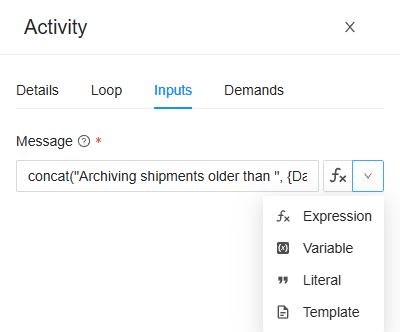
Most inputs have a button on the right of their field. Its face shows how the input is filled in now; its arrow opens the list of the other ways:
| Way | Face | The input gets | Use it for |
|---|---|---|---|
| Expression | ƒx | What an expression works out during the run, such as concat("Hello, ", {Name}, "!"). | Anything worked out from other values. See Expressions. |
| Variable | (x) | The value of one variable, or of one property of it, such as {Shipment.Reference}. | Passing a value on as it is. |
| Literal | ❝ | A fixed value, typed in as it is, such as Stock reserved. or 25. | Values that are the same in every run. |
| Template | a page | The text of one of the process's templates, with the run's values filled in. | Longer texts, such as an e-mail's body. |
| Mapping | a table | A value of a complex type, built property by property. | Building a Delivery from the parts you have. |
Which ways an input offers depends on its type:
- Expression, Variable and Literal: always.
- Template: only for an input that takes one text, not a list.
- Mapping: only for an input that takes a complex type, such as Delivery, or any value at all (an Any input, such as the Value of Set Variable).
- An input with a fixed list of values to choose from offers only Literal, which lists them, and Variable.
- A module can narrow the list for an input of its own, and pick the way a new input starts with. Most inputs start as an Expression; Map starts as a Mapping.
Switching to another way clears the input, so its value isn't misread: a variable's name means something else as a literal.
On a published version, or without permission to change the definition, the fields are grey. The button's face still opens the dialog of an expression, a literal or a mapping, to read it.
Expression
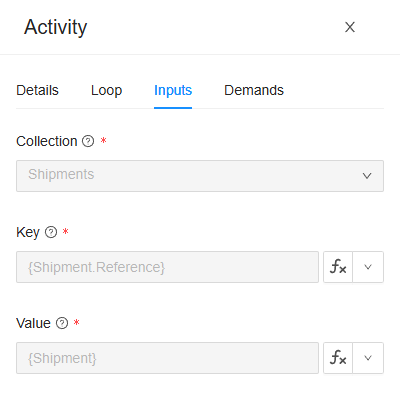
Type the expression into the field, or click ƒx to build it in a dialog. The field checks it as you type, and shows what is wrong under it, such as Expression does not return 'String'. See Expressions.
Plain text is an expression too, as long as it holds none of the characters an expression is made of: ( ) { } , " ' $. Stock reserved. works as an expression; Hello, World! doesn't, because of its comma. When a message under the field says If this is not an expression, switch the field to a literal., that is what happened: pick Literal, and the text is taken as it is.
Variable
Pick a variable from the list. For a variable of a complex type, the list opens up to its properties, and their properties, so you can pick Shipment › Reference, which the input reads as {Shipment.Reference}. Hover over an entry to see its full name.
The list holds the variables the node can read: those of its own process or sub-process and of every process around it, plus ProcessRun, which tells about the run itself (its Reference, its Environment and who StartedBy it). See Variables and parameters.
Only variables of the input's type can be picked. The others are greyed out:
- the variable's type must be the input's type, or the input must take any type;
- an input that takes one value can't take a list, and an input that takes a list can't take one value;
- a property inside a list can't be picked either, since a list has no single value of it: use an expression, such as
first({Deliveries}, "Recipient").
A Variable works exactly as an expression that is just that variable, such as {Shipment.Reference}. Picking it from a list saves you typing, and guards you from typos.
Literal
A value typed in as it is, never read as an expression: {Name} in a literal is the text {Name}. The field fits the input's type:
| The input takes | The field |
|---|---|
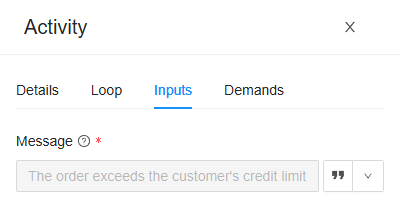
| A text | A text box. ƒx's place shows ❝, which opens a larger box to type in. |
| A whole number, a decimal | A number box. |
| A yes or no (Boolean) | A list of true and false. |
| A date and time, a date, a time | A date or time picker. |
| One of a fixed list of values | A list of those values. |
| A secret, such as a password | A box that hides what you type. |
| A complex type, such as Address | <object>: click ❝ to fill in each property in a dialog, with a Property and a Value column, or Edit as JSON. |
| A list | n items: click ❝ to add, change and delete the items in a dialog, or Edit as JSON. |
| A file | No file: a file can't be given as a literal. Pass one in through a variable. |
Template
Pick one of the process's own templates, by name. When the run reaches the node, Spider fills the run's values into the template, and the input gets the resulting text. Use it for a text too long or too complex for an expression, such as the body of an e-mail. When the input asks for a particular format, such as HTML, the list holds only the templates of that format.
Templates are added on the designer's Templates tab: see Templates and e-mail.
Mapping
A mapping builds a value of a complex type from the values you have, property by property. Use it when the input takes, say, a Delivery, and the run has a recipient, an address and a weight in variables of their own.
The field shows a summary, such as Delivery: 3 of 3 properties mapped. Click it, or the button's face, to open the mapping:
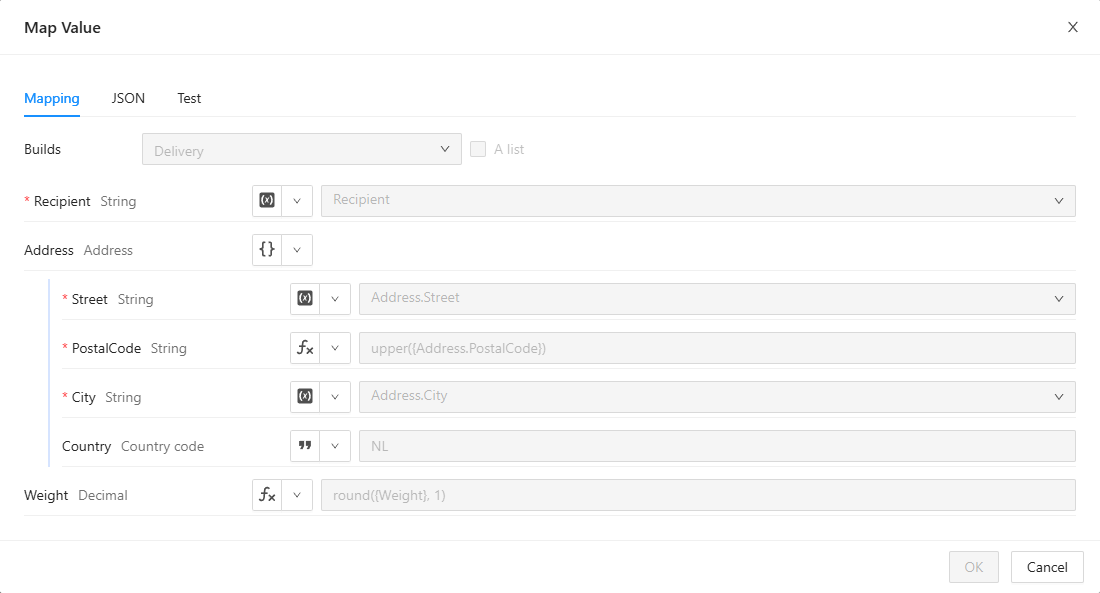
Builds shows the type the mapping builds. Below it is a row for each of the type's properties, each with a button that says how it is filled:
| Way | The property gets |
|---|---|
| None | Nothing: it is left out. |
| Expression | What an expression works out. |
| Variable | A variable, or a property of one. |
| Literal | A fixed value. |
| Properties | A value of its own complex type, built property by property in rows of its own, such as Address above. |
| For each | A list, built from another list: one element for each item of it. See below. |
- Map by name from fills every property that isn't mapped yet from the property with the same name in a variable you pick, and Apply writes the rows. It fills them once: you change them afterwards like any other row.
- Add a named value works a value out once, under a name of your own, so the rows below can read it as
{Name}. Use it for a value several properties need, such asfirst({OrderLines}). - For each takes a list (The list to map, e.g. {Order.Lines}), names its item (as), and maps the properties of Each item from it. where keeps only the items that meet a condition, and group by makes one element per distinct value instead.
- For an input that takes any value, such as the Value of Map, Builds is a list of types: pick the type to build, and tick A list to build a list of it.
The other tabs show the same mapping in other ways. JSON shows it as text, to copy it, or to paste one in. Test builds the value from values you paste in for the variables it reads, and shows the Result, as a run would build it.
A property that is required but not mapped gives a warning: the run fails if it is still missing when the value is built. OK keeps the mapping even with problems, so you can finish it later; the check lists them.
Pickers
Some inputs take one of the organization's or the process's own things. Those inputs have a list to pick from, and no button:
| The input takes | The list holds |
|---|---|
| A connection | The organization's connections of the kind the activity needs. See Connections. |
| A collection | The organization's collections. |
| A counter | The organization's counters. |
| A milestone | The process's milestones, with their icons and colours. See Milestones and reports. |
| A report | The process's reports, with their tags. See Reports. |
| A form | The process's forms. See Forms and user tasks. |
The input keeps the thing itself, not its name, so renaming it breaks nothing. In a sub-process, the milestones, reports and forms are those of the process around it.
The loop's item
On a node that repeats for each item of a list (its Loop tab), the inputs can read the item of the round they are in as {Item}: {Item.Recipient} for a list of Delivery. Each item is available to the inputs as {Item}. Pick Item in a Variable input's list, or write it in an expression or a template.
A sub-process's inputs
A sub-process's Inputs tab has an input for each of its parameters: the variables of the sub-process that have Allow use of this variable as a parameter ticked. They are filled in the same ways, in the process around the sub-process: they can read its variables, and the loop's {Item}. A sub-process without parameters says so: This sub-process declares no parameters, so there is nothing to pass in. Add one on its Variables tab.
A parameter left empty gets its default value. Without one, the check says The parameter 'Delivery' has no value., an error.
A start process run's inputs
A start process run's Process tab asks for:
- Process: the definition to start. (this process) starts this one again.
- Start at: when the new run starts. Leave empty to start the run at once. A time that has already passed starts it at once too.
- A field for each parameter of the process's published version, filled in the same ways as an activity's input. A parameter that holds files can't be given one: Holds files, which can't be passed to a run started from a process.
A process that was never published can't be started this way. A parameter left empty starts the run without a value, and the check warns about it.
What the check says
The designer's check looks at every input. These are its messages, with input reading parameter for a sub-process or a start process run:
| Message | What to do |
|---|---|
| The input 'Message' is required, but has no value. | Fill it in. |
| The input 'Key' has an invalid expression: … | Correct the expression; the rest of the message says what is wrong. See Expressions. |
| The input 'Value' does not match its declared type 'Decimal': … | The value is of another type than the input takes. Convert it in an expression, or pick another variable. |
| The input 'Value' is bound to a variable, but its value is not a single variable reference. | Pick a variable again, or make it an Expression. |
| The input 'Body' is bound to a template that does not exist. | The template was deleted: pick another one. |
| The input 'Value' is a mapping that leaves something out: … | A warning: map the required properties it names. |
| The node repeats for each item, but none of its inputs reads {Item}. | A warning: read {Item} in an input, or untick Repeat for each item. |
Related chapters
- Expressions: what an expression can do.
- Variables and parameters: where the values come from.
- Types: what each type holds, and which fits which.
- Outputs: where an activity's results go.